Polestar Premium is a WordPress plugin. Install its ZIP file at PluginsAdd PluginUpload Plugin, then enter your license key at PluginsPolestar Premium. To buy it, see the Polestar theme page.
Install the Plugin
- Go to AppearanceThemes and make sure Polestar is installed and active. If not, click Add Theme, search for polestar, then install and activate it.
- Download the Polestar Premium ZIP file. Use the link in your purchase email, or the Downloads tab of your dashboard. Keep it as a ZIP file.
- Go to PluginsAdd Plugin and click Upload Plugin.
- Choose the ZIP file and click Install Now.
- Click Activate Plugin.
Polestar Premium also works when a child theme of Polestar is active.
Safari
Safari unzips downloads automatically, and WordPress needs the ZIP file. If you see a Polestar Premium folder after the download, turn off automatic unzipping in Safari and download the plugin again.
Activate Your License
Your license key is in your purchase email and on the Licenses tab of your dashboard. Activating it turns on plugin updates.
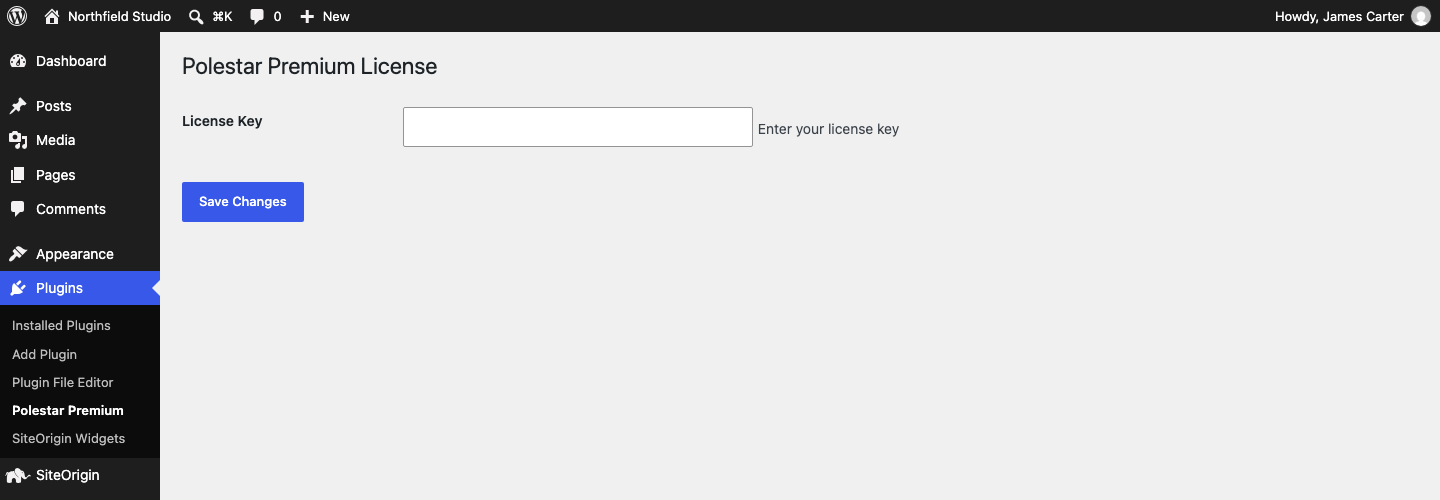
- Go to PluginsPolestar Premium.
- Enter your key in License Key and click Save Changes.
- Click Activate License. The button appears after you save a key. The page then shows Active.
To release the key from a site, click Deactivate License on the same page.
New versions appear at DashboardUpdates, like any plugin update.
Manage Your Activated Sites
Add or remove sites on your license from your dashboard. See Managing Your Premium License. For help, use the contact page.
Related
- Managing Your Premium License
- Customizer Theme Settings
- Widget Areas
- Polestar Free vs Premium
- Find Your Order Number or License Key