Use Blog to choose the blog layout and to show or hide post details. All Blog settings are in the free theme. Go to AppearanceCustomizeTheme SettingsBlog.
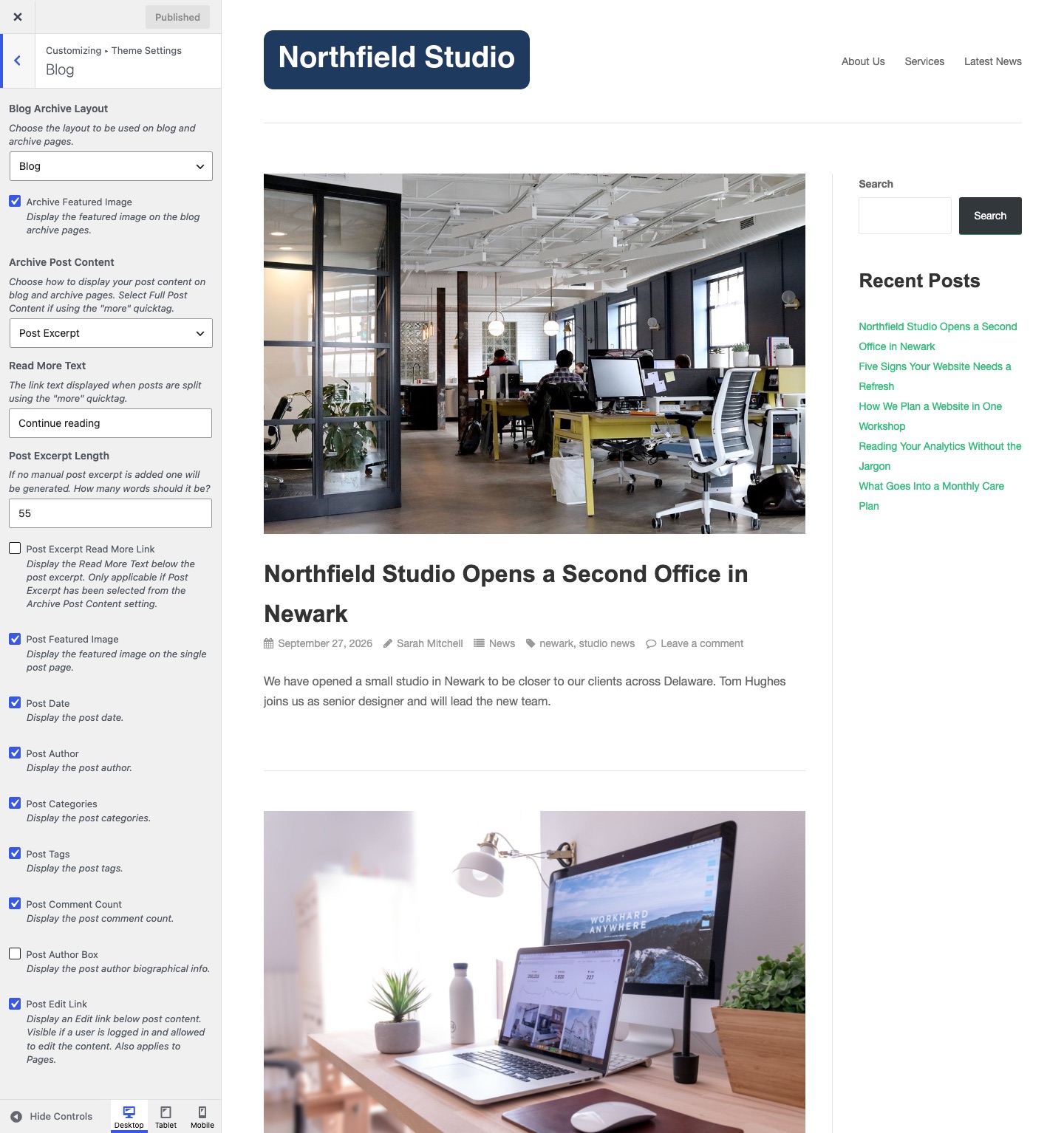
Blog and Archive Pages
Blog Archive Layout
The layout of the blog page and of archive pages such as categories, tags and authors. Default: Blog.
- Blog: a full-size featured image above the post.
- Left Aligned Medium: a medium featured image to the left of the post.
- Left Aligned Thumbnail: a small featured image to the left of the post.
Archive Featured Image
Show the featured image on the blog page and on archive pages. Default: on. See Featured Images.
Archive Post Content
Show the full post or an excerpt on the blog page and on archive pages. Default: Full Post Content. Choose Full Post Content to split a post with the More block or the “more” quicktag. Choose Post Excerpt to show a short summary.
Read More Text
The text of the link that continues a post. Default: Continue reading. Puro uses it for a post split with the More block or the “more” quicktag. It also sets the text of the excerpt link when Post Excerpt Read More Link is on.
Post Excerpt Length
The number of words in an automatic excerpt. Default: 55. It has no effect on a post that has a manual excerpt.
Post Excerpt Read More Link
Show the Read More Text link under an excerpt. Default: off. It applies only when Archive Post Content is set to Post Excerpt.
All Blog settings show at all times in the Customizer. Settings that do not apply to your choice have no effect.
Write a Manual Excerpt
- Edit the post.
- In the block editor, open the post settings sidebar and expand Excerpt. In the Classic Editor, click Screen Options and turn on Excerpt.
- Type the excerpt.
- Click Update.
Single Posts
Post Featured Image
Show the featured image above the title on a single post. Default: on.
Post Date
Show the publish date in the post meta. Default: on. Post meta sits under the post title on the blog page, archive pages, search results and single posts.
Post Author
Show the author name in the post meta. Default: on.
Post Categories
Show the post categories in the post meta. Default: on.
Post Tags
Show the post tags in the post meta. Default: on.
Post Comment Count
Show the number of comments in the post meta. Default: on. The count links to the comments. The count shows only when comments are open. A post with no comments shows Leave a comment.
Post Author Box
Show the author name, photo and biographical info below a single post. Default: off. Add the biography in UsersProfile. To allow HTML in it, see Allow Post Author Bio HTML Markup.
Post Edit Link
Show an Edit link below the content. Default: on. Only logged-in users who can edit the post see it. The setting also applies to pages.