Eros Di Pietro Sep 7, 2016 · 11:06 am #4780

Good morning,
after last update i see a padding under menù. can you help me? web site is http://www.lextel.it/public
there you can see the screenshot
Good morning,
after last update i see a padding under menù. can you help me? web site is http://www.lextel.it/public
there you can see the screenshot
This reply has been marked as private.
sorry, Skype not work for proxy. you can try now? the system advisor change a setting.
regards
No problem at all. Feel bad for all the messages so if you have any allowed chat program and would prefer that, let me know.
403 error fixed. Will report back ASAP.
Is the problem still occurring for you on the test site?
Super, glad to hear it’s working. I cleared cache and then deactivated caching plugin on test site. Not sure for main site.
(Sorry, email replies aren’t setup for the forum at the moment. This isn’t something bbPress comes with. I tried for a while to setup a plugin but had a lot of problems so we’re back to forum only replies for the mean time 🙂 )
This reply has been marked as private.
Seems ok now on the main site. Try refresh Firefox a few times. I cleared the cache of the caching plugin.
(I forgot to change your test site back to IT, apologies.)
sorry, but i have problem whit google chrome and firefox 🙁
i have clean cookie in the browser
regards
Hi Eros
Apologies for the delay. The issue is that at first, the navigation doesn’t have enough space to fit, as a result it goes onto two lines. At this moment the sticky header script calculates the width and height of the header, the height is, of course, double because the menu is on two lines. Then, Custom CSS is applied in load order and the header resizes because the menu is now on one line. However, the header has already calculated width and height and doesn’t calculate it again.
Please, can you raise the role of my user profile on the live site to Administrator, I’ll try adjust the Custom CSS very slightly or perhaps the button positioning and see if I can prevent the initial load issue.
Thanks
Good morning, the role is administrator. thank you so much.
Thanks, please, try now.
Sorry, i see the padding. 🙁
regards
Do you know how to use your browser’s inspector (developer tool)? If you do, can you confirm you are looking at the new Custom CSS value for menu item right margin. Inspect any of the menu list items, you should see:
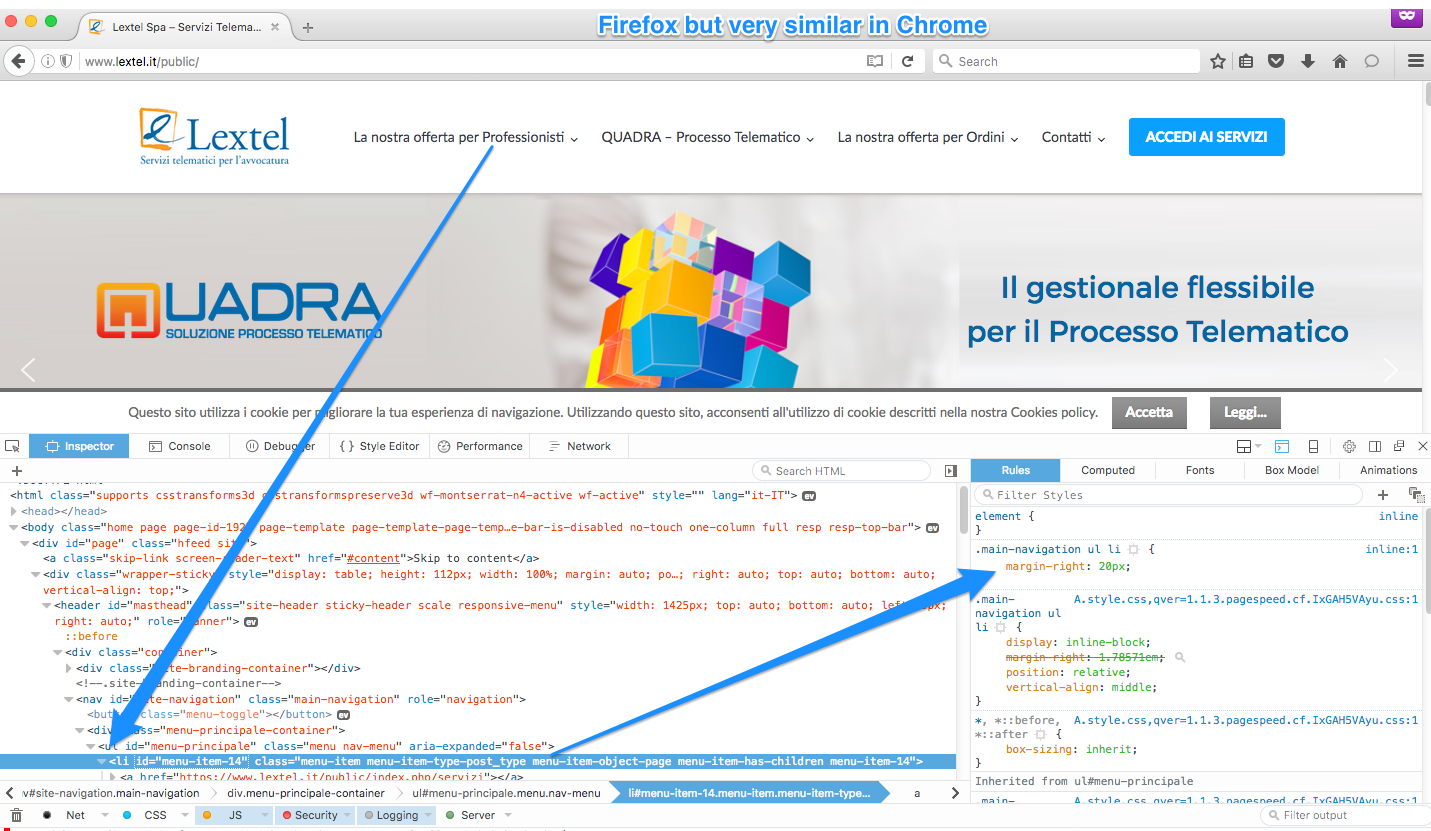
yes i can use.
it is possible that the problem is this?

regards
Please, can you specifically check the list item selector that I highlighted in my screenshot. We need to confirm that the custom CSS right margin is active on your machine.
