PSBakh Sep 21, 2016 · 1:41 pm #4953
 Hey guys,
I’ve now built a couple of sites using Ultra and SiteOrigin page builder and widgets bundle. So far, everything seems to be going well, apart from that I cannot seem to find a consistent way to get rid of the white space between my homepage slider and main nav.
This code:
.site-content { padding: 0em; }
seems to work fine for these sites:
http://www.rpcvs.co.uk/
http://www.rphc.co.uk/
this one:
.home.siteorigin-panels-home .site-content, .page-template-home-panels .site-content, .page-template-full-width-no-title .site-content > .container, .page-template-default-no-title .site-content > .container, .blog .site-content .container.no-blog-title {
padding-top: 0em;
}
seems to work fine for
http://www.regentsparkhealthcare.com/
but neither work for:
http://www.workshopsforwomen.co.uk/
I feel like I’m missing something very simple.
Any thoughts?
 Andrew Misplon Staff Sep 21, 2016 · 3:17 pm #4954
 Hi PSBakh
For the last one:
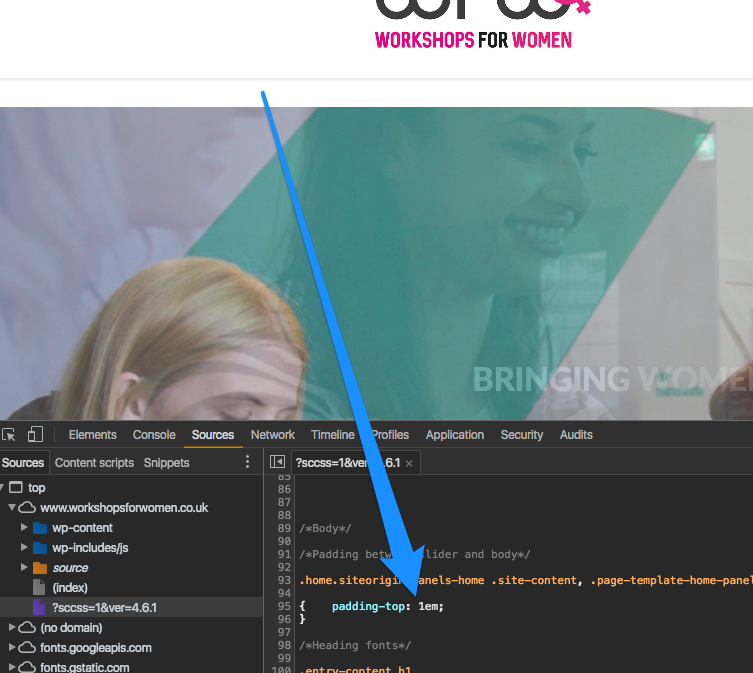
In Custom CSS you have:
.home.siteorigin-panels-home .site-content, .page-template-home-panels .site-content, .page-template-full-width-no-title .site-content > .container, .page-template-default-no-title .site-content > .container, .blog .site-content .container.no-blog-title

{padding-top: 1em;}
That’s where the padding is coming from.
We’ll introduce the top padding as a page setting in the next update. I hope to have that released in the next few days.
PSBakh Sep 21, 2016 · 4:30 pm #4955 Hi Andrew! Thanks for a quick response.
Hmm, I’ve double checked my Custom CSS for Workshops for Women site , and the padding is set to 0em. Very strange.
Is there anything I can do in the meantime, before the new update is released?
Andrew Misplon Staff Sep 21, 2016 · 5:41 pm #4957 Is there a caching plugin being used perhaps? Custom CSS still shows 1em.