
- This topic has 33 replies, 2 voices, and was last updated 9 years, 5 months ago by
Andrew Misplon.
- AuthorPosts
- September 15, 2016 at 10:14 pm #4911
Filip7ParticipantHello, I have an issue,
I have my main menu like this:Home / anchor1 / anchor2 / anchor3 / page2 / page3
when I’m using link to my anchors like #target , the link doesnot work when I’m on other page then the anchor is located, and when I usel full URL like: mywebsite.com/mainpage/#target , all buttons in my menu are highlighted.
For example, on ma homepage are anchors 1-3, and when I use full URL, buttons : Home / anchor1 / anchor2 / anchor3 are highlighted in the same time.
Can you please help me?
Thank you.
September 15, 2016 at 10:16 pm #4912
Andrew MisplonKeymasterHi Filip7
Please, can you send a link so we can take a look. There is a private reply option below if required.
September 15, 2016 at 10:17 pm #4913
Andrew MisplonKeymasterYou’d need to prefix the anchor for it to work across pages:
http://mywebsite.com/my-page#myanchorSeptember 16, 2016 at 7:39 am #4914
Filip7ParticipantThank you for response,
unfortunately, i cant give you a link, Im building this page on localhost.But here is the pic of the menu: https://s16.postimg.org/8bip6vqzp/Menu_issue.jpg
As you can see, when I use : http://mywebsite.com#myanchor , all menu buttons linked to home page anchors are highlighted.
Tank you
September 16, 2016 at 7:44 am #4915
Filip7ParticipantFor example, Im using this link:
http://localhost/website.com/#ShowsSeptember 16, 2016 at 12:45 pm #4923
Andrew MisplonKeymasterFor interest sake, we recently added smooth scroll and one-page menu indication to Ultra. If you want to make use of this feature the page content will need to be in Page Builder. Your anchors need to be inserted as follows, edit a Page Builder row by clicking the wrench icon far right then Edit Row > Attributes, insert your anchor ID into the ID field, without the hash.
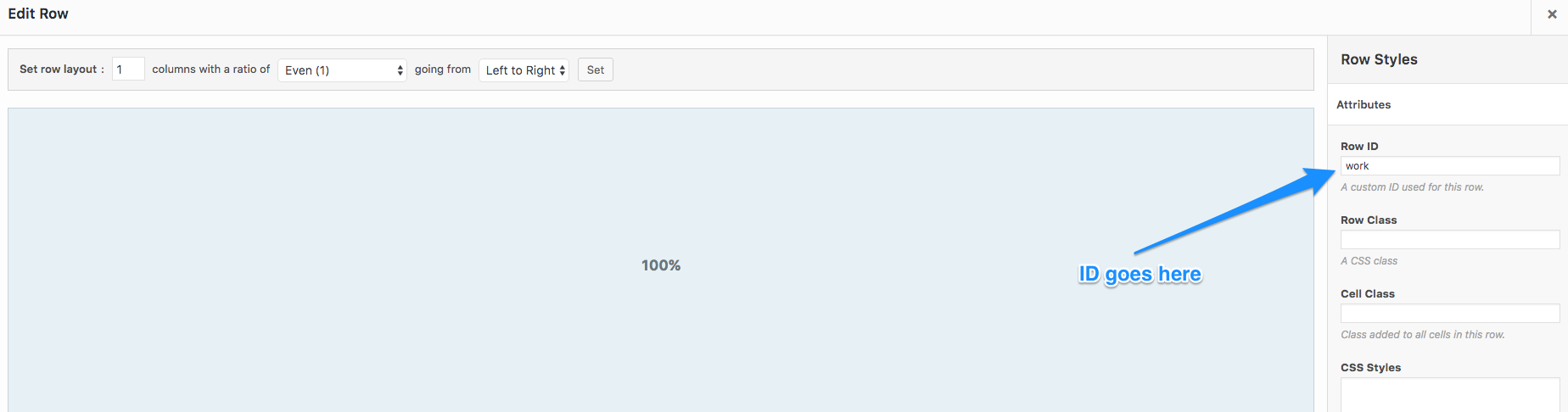
The issue we face on the home page is that for some reason, only on the home page, the menu items all get the
current_page_itemclass if prefixed with the site URL. This same situation doesn’t occur on other pages. Let’s roll back the targeting ofcurrent_page_item. If you don’t have a Custom CSS plugin, install Simple Custom CSS and go to Appearance > Custom CSS. Insert:/* Current Page Item */ .main-navigation .current_page_item > a { color: #0896fe; }Change the color to your desired menu color.
Let me know how that goes. If you try the new smooth scroll feature I outlined in the above screenshot, please, let me know 🙂
September 16, 2016 at 12:47 pm #4924
Andrew MisplonKeymasterBackground:
Current page item is being targetted to provide a current menu indication when a custom menu hasn’t been saved to the primary menu location. I’ll remove that for the next version so that above Custom CSS snippet is a hotfix and can hopefully, be removed without issue after updating to the next version, thanks for your feedback.
September 16, 2016 at 1:49 pm #4925
Andrew MisplonKeymasterFor the menu link underlines, try disabling that option at
Customize > Theme Design > Main Menuand then manually add it back to Custom CSS, swapping my color value with yours:.main-navigation:not(.toggled) div > ul > li.current-menu-item > a { border-bottom-width: 3px; border-bottom-style: solid; }Working on this now. Will have it all resolved in the next update.
September 16, 2016 at 2:21 pm #4926
Andrew MisplonKeymasterApologies for the flurry of messages. I see the issue with the one our current menu item styling vs one-page menu item styling has been setup. Specifically, when one-page anchor links need to work from other pages and therefore be prefixed with the URL which causes WordPress to assign them as a current link. I don’t have a solution right away. If possible, please, let me look at this over the weekend and come back to you with a solution. Worst case I’ll work up a custom fix for you, that’s worst case though, this is a problem we need to overcome. Thanks for all of your help and feedback.
September 16, 2016 at 4:28 pm #4927
Filip7ParticipantHello Andrew,
thank you for your effort.
Custom CSS solution did not work. Can you tell me more about that Row ID solution? I dont get it. I set up the ID and then do what?Thank you.
September 16, 2016 at 6:03 pm #4928
Andrew MisplonKeymasterUltra looks for ID’s in Page Builder rows. If you insert your ID into a Page Builder row as I indicated in my screenshot, Ultra will then smooth scroll to that location from the menu and also handle current menu indication. At the moment there are issues with this system using full URL’s instead of a hash only. I’m going to work on this over the coming days so if at all possible, perhaps you could continue to your develop your site in other areas and come back to this, at which point we’ll hopefully have these issues resolved.
I’ll make a quick video for you now on how the current one page system works.
September 16, 2016 at 6:25 pm #4933
Andrew MisplonKeymasterHere is a quick demo on how it currently works. Due to a cross-over with current menu item styling, issues occur if a full URL instead of just an ID is used in the menu. We’ll work on this and resolve ASAP.
September 16, 2016 at 7:46 pm #4938
Filip7ParticipantThank you very much for your effort.
Its very unusual, how you are trying to help me. I followed your video, and it worked as you showed me. Now I will wait until you will fix the prime issue.
Tank you.
September 16, 2016 at 7:49 pm #4939
Andrew MisplonKeymasterSuper, glad we’ve made some progress. Thanks for your understanding and support.
Thanks for highlighting the problem with full URL’s and our one-page navigation. We’ll get these problems resolved and pushed in an update as soon as possible. I’ll revert as soon as I know more.
September 19, 2016 at 5:39 pm #4942
Filip7ParticipantThank you, I will launch my website like this, and wait for your patch.
- AuthorPosts


You must be logged in to reply to this topic.