
- This topic has 10 replies, 3 voices, and was last updated 9 years, 8 months ago by
Andrew Misplon.
Tagged: drop down menu
- AuthorPosts
- July 11, 2016 at 9:15 pm #4059
TriciaParticipantHi there,
I’m trying to convert one of the menus to a drop down menu to be placed within a page on my site (http://dev.cwpd.org/parks/find-a-park/). Is there a simple way to do this within the Ultra theme?
Thanks,
TriciaJuly 12, 2016 at 9:18 am #4066
Andrew MisplonKeymasterHi Tricia
Thanks for posting your question 🙂
I tried four plugins and this looks to be the best I’ve seen so far: https://wordpress.org/plugins/advanced-menu-widget/. It hasn’t been updated in a while but seems to be working nicely. You can enable the drop-down menu as follows:
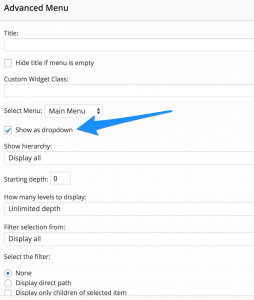
I’m not sure if you are looking for something this simple. Unfortunately, WordPress doesn’t have drop-down functionality built into the default Custom Menu widget like it does with the Archives widget.
Let me know how it goes. We can always adjust the text size of the drop-down if it isn’t suitable.
July 20, 2016 at 6:41 pm #4267
TriciaParticipantThanks Andrew. I had some problems with this conflicting with other plug-ins I had, so didn’t end up using this. I ended up using a “spoiler” shortcode that did the trick. Not exactly a dropdown, but good enough for what I needed.
Thanks!
TriciaJuly 27, 2016 at 12:50 pm #4317
Andrew MisplonKeymasterHi Tricia
Really sorry I missed your reply to this thread, not sure how it slipped by. Glad to hear you found a solution, if you’d like me to look at this again in the future, let me know.
All the best.
August 4, 2016 at 4:58 am #4375
bonfireParticipantHi Tricia,
I’m having the same problem can you please explain how you changed to a drop down menu?
Currently mine is drop down on web but not on mobile its a different setting. As I have lots of pages I need them all neat and tidy on mobile.Thanks
August 4, 2016 at 8:56 am #4379
Andrew MisplonKeymasterHi bonfire
Thanks for reaching out.
This thread is a little different to your question, it’s discussing drop-down menu widgets used in page content.
The Ultra mobile menu doesn’t currently have the ability to toggle drop-downs in the mobile menu. We have added this feature in the next update. We hope to release the update in the next 1-2 weeks.
August 4, 2016 at 9:02 am #4380
bonfireParticipantOh okay thanks for getting back to me. Is there any plugin or other way I can currently have it so on mobile it’s not a massive drop down list and it is categorises ( for example treatments and procedures we have about 20 under that categorie so the list is displayed forever down the page on mobile)
Thanks!
August 4, 2016 at 9:07 am #4382
Andrew MisplonKeymasterSure 🙂 A short-term solution might be to add the following to Appearance > Custom CSS:
.responsive-menu .main-navigation.toggled ul ul {
	display: none !important;
}
You’ll need a plugin like Simple Custom CSS installed to have access to Appearance > Custom CSS.
That snippet will hide the sub-menus on mobile.
August 4, 2016 at 9:15 am #4383
bonfireParticipantAwesome thanks! I don’t want them hidden for customers though I just wanted it seperate or if you click on treatments and procedures will it come up under that? Sorry hope that makes sense!
Thanks for your help! Because at the moment we have about 30 pages so as you can imagine the list is long but we still want customers to be able to view these.
Thanks!
August 4, 2016 at 9:29 am #4385
Andrew MisplonKeymasterSure, I completely understand, it’s definitely a feature we’d like to see released right away. It’ll perhaps take 45 minutes of custom development time to add toggling sub-menus to your installation, it would require a child theme. Ideally, that time would go into getting this new version ready for release which has this feature built in. There are mobile menu plugins that you can use like:
But these usually have some setup challenges like getting the menu toggle in the right place. You’d need to disable the Ultra responsive menu from Theme Settings before using one of the above. You could definitely give one of the above a try as a stop gap solution.
If you’re using Ultra Premium, please send me an email on [email protected] and I’ll try implement the custom solution discussed in the first paragraph.
August 4, 2016 at 10:35 am #4386
Andrew MisplonKeymasterbonfire, drop me a mail on [email protected]. I’ll try help 🙂
- AuthorPosts


You must be logged in to reply to this topic.